
CharityStack changelog
Team User Management, Smarter Dashboard, and Faster Checkout - February Release Log
This has been a month of meaningful upgrades across the donor experience and your CharityStack dashboard. Here’s a quick look at the new features we’ve added so that you can empower your non-profit to fundraise better.
Donor Experience
Redesigned Checkout Flow
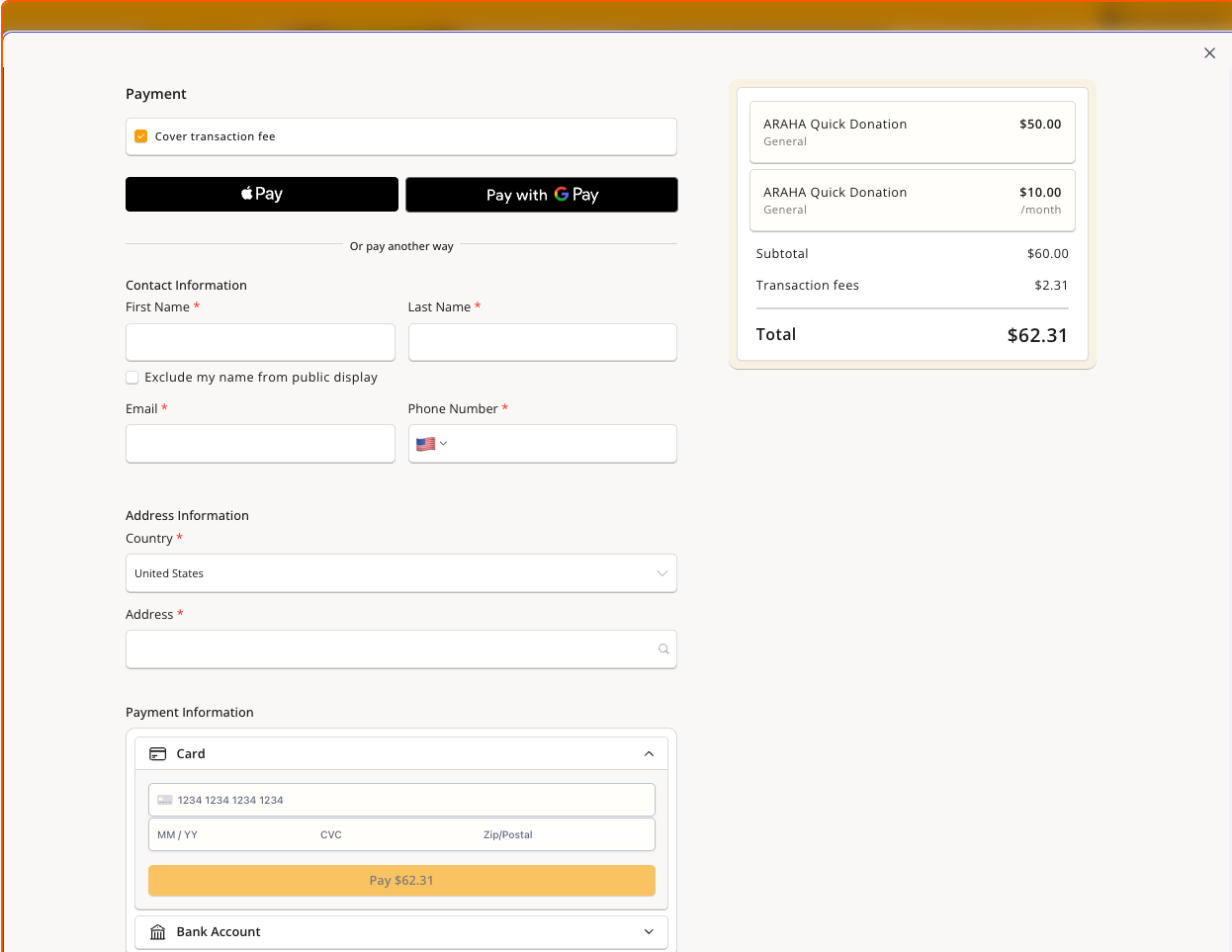
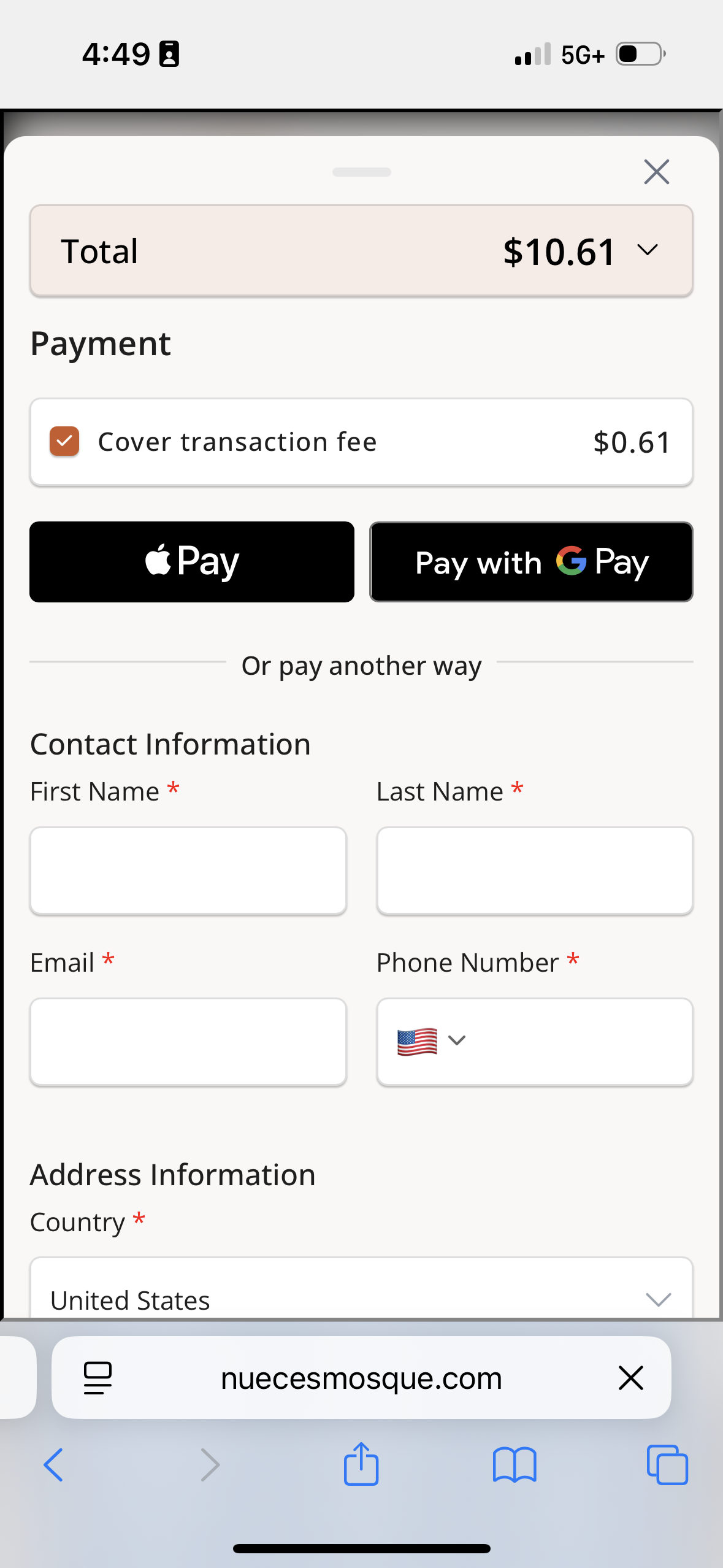
We iterated on our recent checkout redesign to bring our multi-page checkout to just a two-step checkout - making a donor’s checkout quicker and easier than ever.
Express checkout (Apple Pay, Google Pay) collects lets donor pay in a single tap
Mobile-optimized layout with improved input sizing, drawer behavior, and touch-friendly controls
Optimized for autofill, most desktop donors can complete their donation in seconds
We’ve seen improvements in donor conversion rates, and will continue to improve the donor experience to empower your fundraising.
Pre-Filled Donation Links
Generate pre-filled donation links that set the amount, frequency, fund, and more - before the donor even lands on the form. This can increase marketing effectiveness - drop a pre-filled link into a marketing email or SMS campaign.
This guided setup tool chatbot will set up your links in minutes:
Target a specific form, or all forms on a page
A donor clicks and lands on a form with "$25/month" already selected, reducing steps from click to donation
Pre-fill amount, frequency, fund selection, and sponsorship options via URL parameters
Additional Donor Info
Dedication Information
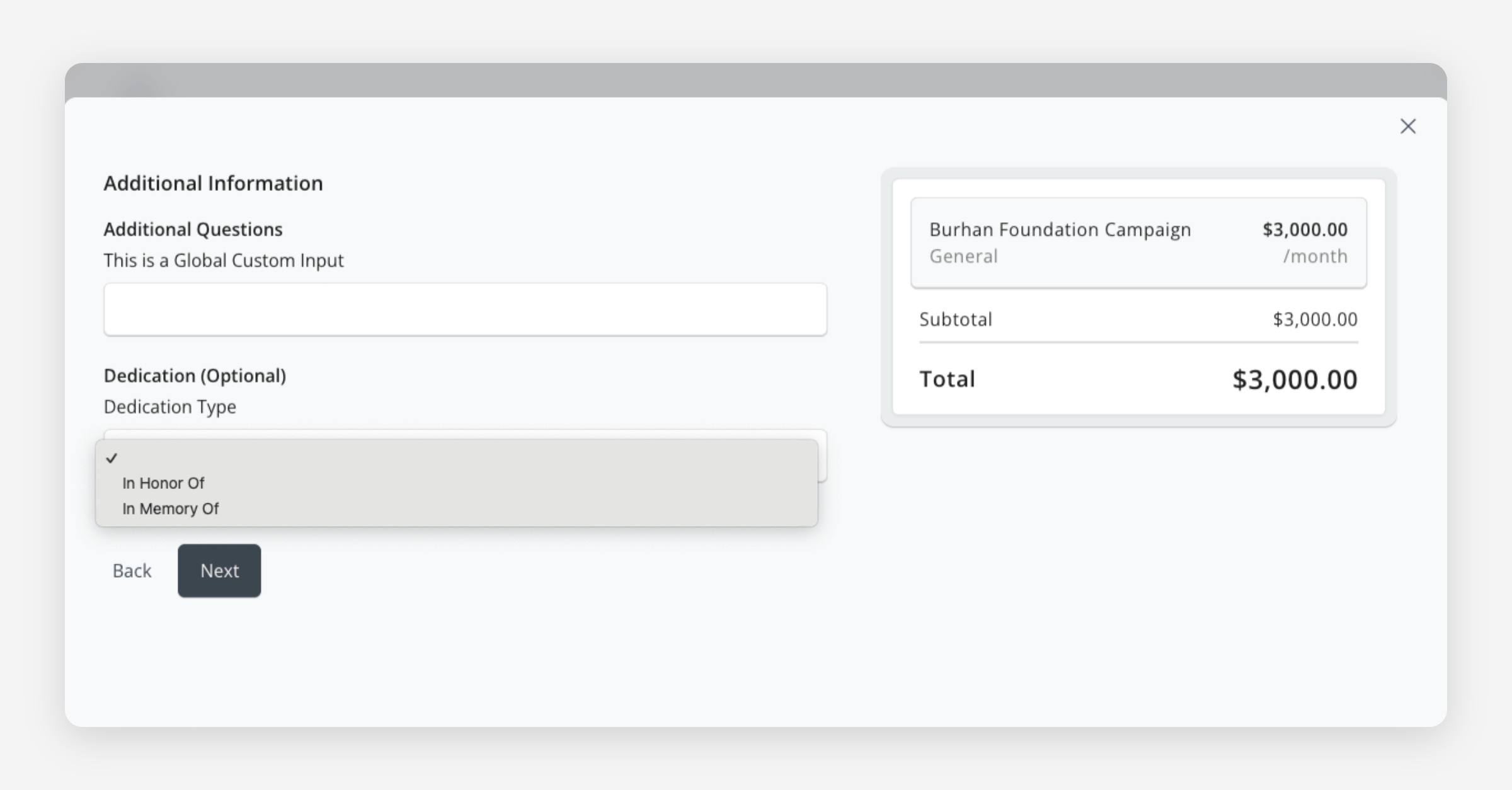
Donors can now add "In Honor Of" or "In Memory Of" dedications at checkout, along with a message. Optional and donors can skip at any time
Dedication details and message are captured alongside the standard payment data and visible in your dashboard.
How to enable: Open any fundraiser form → Form Configuration tab → Checkout Details step → toggle "Enable Dedication"
Communication Consent
Collect explicit opt-in consent from donors at checkout, and find responses in your Dashboard. This helps you stay compliant with privacy requirements while keeping opt-ins transparent.
How to enable: Open any fundraiser or event form → Form Configuration tab → Checkout Details step → toggle "Enable Communication Consent"
Improved Cart & Donation Summary
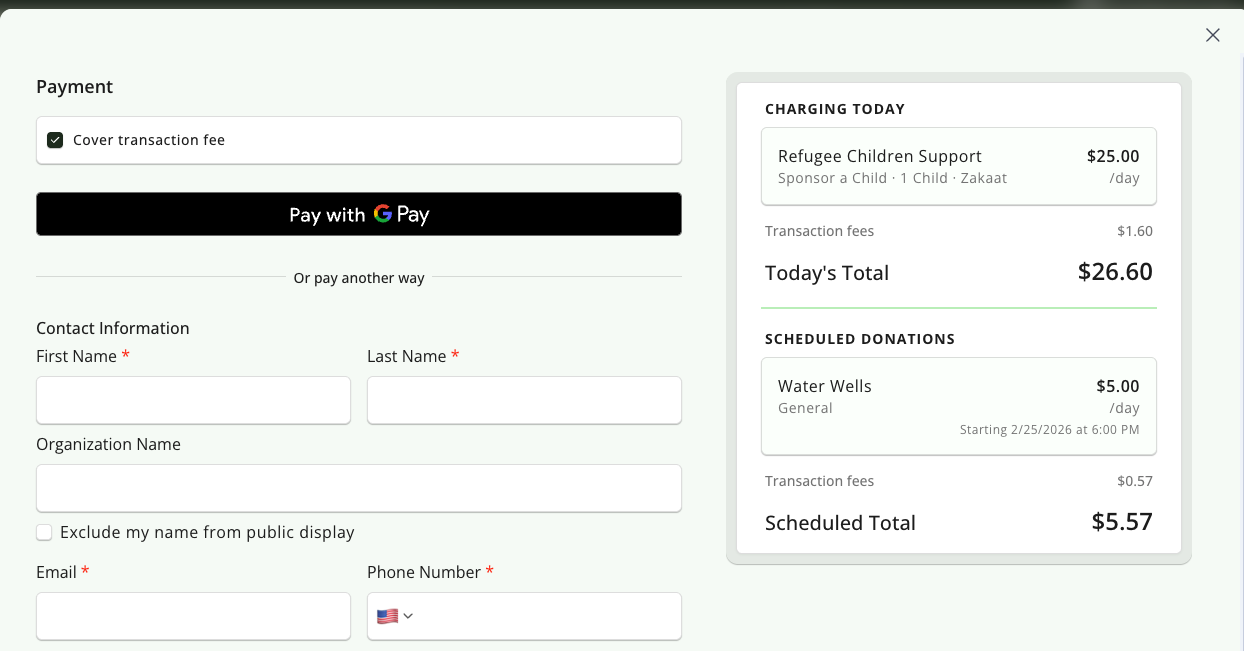
The donation summary is now clearer for both one-time and scheduled donations:
Scheduled vs. immediate charges are visually separated
Cart item labels are more descriptive in multi-item transactions
Dashboard
Sign-In & Role-Based Access Control
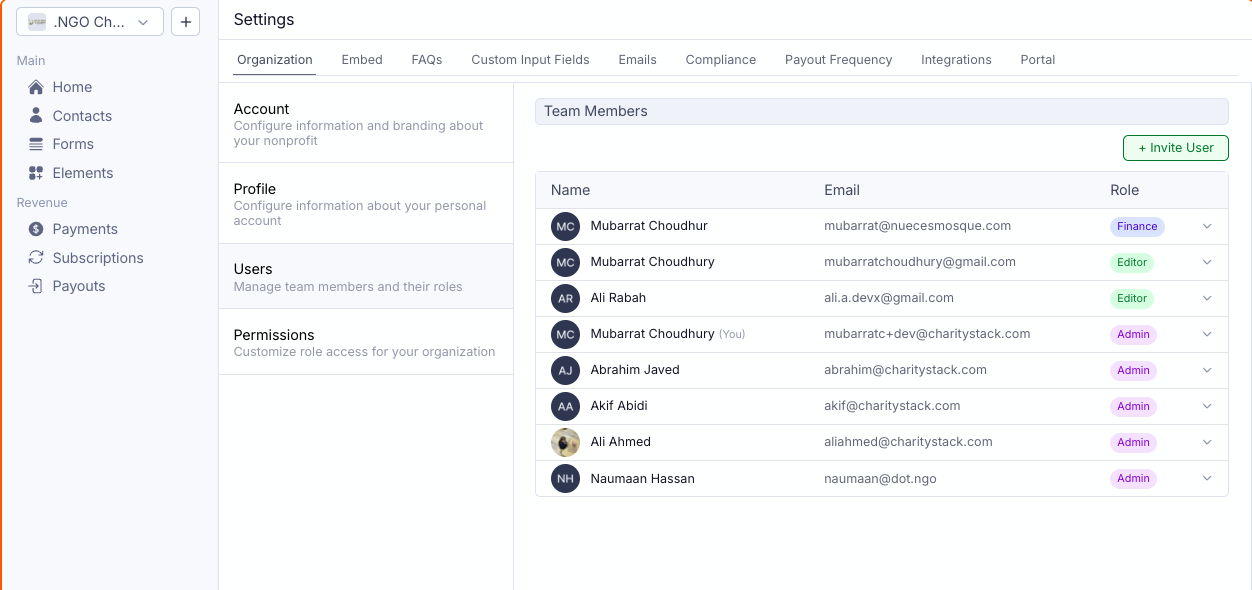
We've made it easier than ever to add and manage your team on the CharityStack Dashboard
New secure sign-in experience
User management: Invite team members, assign roles (Admin, Finance, Editor, or custom roles), and control who can access what
Permissions: Fine-grained control over contacts, transactions, subscriptions, forms, payouts, settings, and more
How to manage: Settings → Organization → "Users" to invite and manage team members, or "Permissions" to customize what each role can access (admin-only)
Frequency-Specific Form Configuration
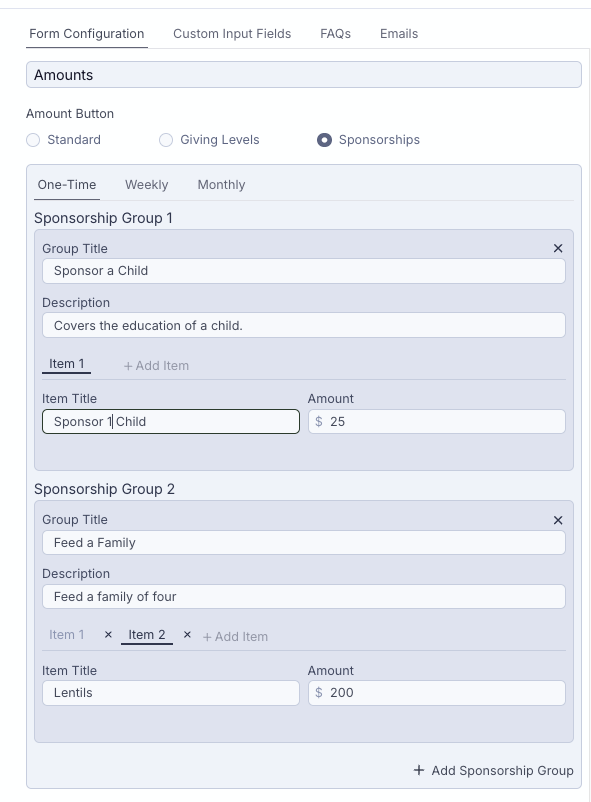
You can now configure different giving level presets and sponsorship options per frequency (one-time, monthly, weekly, etc.) for all Fundraising Form types
Set different suggested amounts for monthly vs. one-time — e.g., show $10, $25, $50 for monthly but $100, $250, $500 for one-time
Why this matters: A donor is far more likely to commit to $10/month than $100/month.
Before this, setting your one-time presets higher would also push your monthly presets higher. Now you control each independently
Recurring donors have a significantly higher lifetime value — optimizing your monthly presets for conversion directly impacts long-term revenue
How to enable: Open any fundraiser form → Form Configuration tab → Amounts step → use the frequency tabs (One-Time, Monthly, Weekly, etc.) to set amounts independently for each
Other Dashboard Improvements
Form Duplication
You can now duplicate an existing form with a single click, no more rebuilding similar forms from scratch. All configuration (giving levels, custom inputs, funds, frequency settings) carries over to the new form.
How to enable: In the Forms table, click the three-dot menu (⋮) on any form row → select "Duplicate Fundraiser" or "Duplicate Event" → a pre-populated creation drawer opens with all settings copied
Lock Dates for Scheduled Donations
You can now lock the start and end dates on a per-frequency basis in the fundraiser configuration. When locked, donors must donate within the window you set - they can't change the schedule.
Great for seasonal campaigns (e.g., "Donate monthly for the duration of Ramadan")
How to enable: Open any fundraiser form → Form Configuration tab → Frequency step → enable "Scheduled Payments" → select a frequency tab (Monthly, Weekly, etc.) → set your start/end dates → check "Lock [frequency] dates for donors"
Dashboard Navigation & UI Polish
Improved dashboard navigation - you can now seemlessly navigate between transaction, subscription, contact, and form details for a donor.
End-of-Year Tax Receipts, Deleting Offline Payments, Merging Contacts & Bulk Edits
Year‑End Tax Receipts
Prepare, send, and track your year‑end tax receipts in one place.
You can now generate tax receipt information per contact with a ready‑to‑send email and PDF. Each contact now has a tax receipt section with quick actions to view, download, or send yearly receipts, and you can filter by “Year Paid” to target the right supporters.
Navigate to the settings page to edit the message within the email and pdf for your end-of-year tax receipt.
Our hope is that this reduces manual work at the end of the year.
Bulk Actions for Contacts and Payments
Edit, export, delete and send tax receipts in bulk.
On the Contacts page, you can bulk select fields, export selected rows to CSV, and email or download tax documents in one go.
On Payments, you can bulk select fields, export, resend receipts, and mark transactions as non‑deductible, or delete offline payments when needed. These actions respect your filters so you only update what you intend to update.
Bulk operations save hours on data cleanup and back‑office tasks, especially during reporting periods. They keep teams aligned and reduce errors by applying consistent changes across many records. Go to Contacts or Payments and select rows to see available bulk actions in the toolbar.
Non‑Deductible Payment Controls and Delete Offline Payments
Flag payments as not tax‑deductible from the dashboard. You decide which transactions should be excluded from end-of-year tax receipts. This keeps donor communications accurate and avoids downstream edits.
You can also delete offline payments either individually or in bulk when selecting multiple.
Time Zone Controls
Set your organization’s time zone so dates and times display consistently across the dashboard, reports, receipts, and exports. Event builders also respect per‑event time zone selection, and pickers now pass accurate dates. You see consistent timings in attendee views, emails, and hosted pages.
This reduces confusion across teams and supporters, especially for national or international audiences. Go to Settings → Organization → Time zone to set your default. Choose event‑specific time zones in the Event drawer when creating or editing an event. Available today on all plans.
Forms and Checkout Redesign + Form Builder & Stand Alone Elements
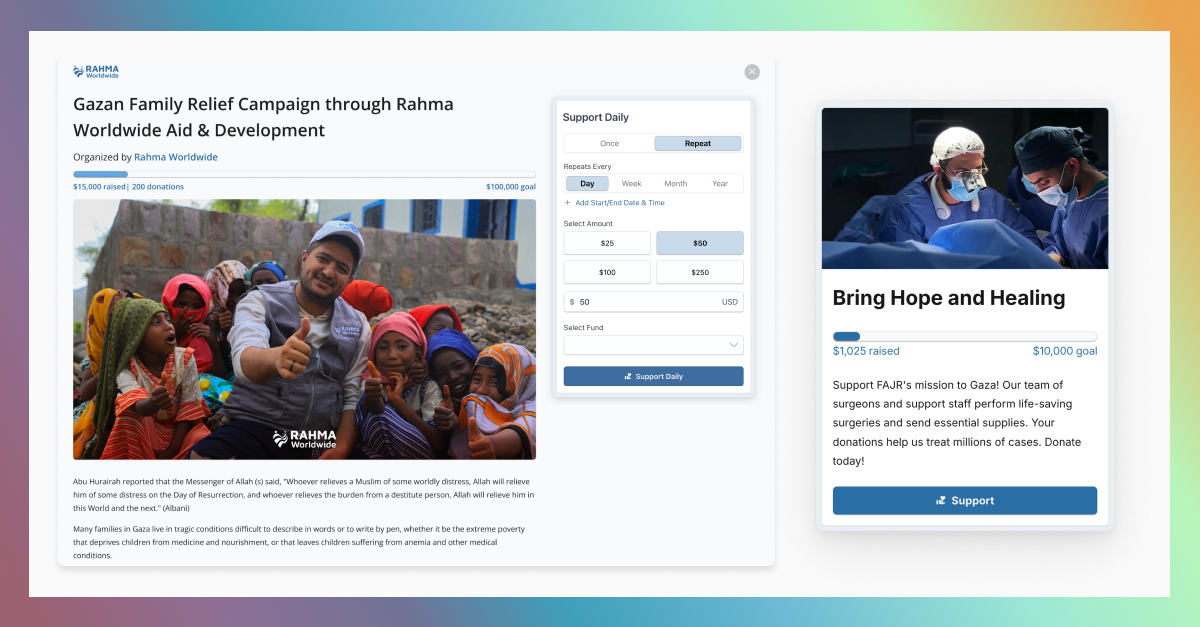
We've been busy here at CharityStack. After months of development, we're excited to make our redesigned fundraising and event forms, checkout, and dashboard available to all users.
We've completely reimagined the donation and ticketing experience, improved how users build forms and standalone elements, and elevated the overall dashboard design.
Forms and Checkout Redesign
Simply put, our fundraising and event forms no longer look like they were built in 2008. We've improved the overall experience for contacts.
Key additions include:
A new details page that can be configured before the amount input. Users can now showcase a title, description, fundraising bar, and FAQs from the embed form.
Sponsorship forms now offer a simpler experience for donors and support recurring frequencies
Free tickets no longer require double confirmation
Company matching through our Double the Donation integration has a dedicated page
Scheduled payments now appear on the form instead of the checkout
New multi-select input type for custom fields
Mobile-optimized hosted pages
Removed the rarely used "Quick Donate" form type
Share links and the ability to share to social media platforms
When users navigate to their website, they'll see the new forms and checkout.
Enhanced Form Builder: Previews, Native QR Codes, & Elevated Design
The dashboard has a fresh look and feel with updated styling and new features that make creating and editing forms and elements much easier.
This includes standardizing the creation process for all objects—payments, contacts, forms, and elements.
The enhanced form builder now includes previews for both the embed form and the hosted page, making form creation much easier for users.
Other improvements include:
The ability to process payments for events
The ability to create objects directly from their specific pages (Payments, Contacts, Forms, & Elements)
Native QR code for each form that directs to the hosted page
Easier form editing from the form details page
View applied promo codes for events on the payment detail sheet
Crop images for forms and logos
Standalone Elements and the Element Builder
The final major feature is standalone elements and the element builder. Previously, elements were directly connected to forms. Now you can create elements through the dashboard that point to different forms. You can also edit which forms different elements point to. Standalone elements we support include:
Add to Cart: Allows people to donate through multiple forms on your website
Fundraising Bar: Tracks donations from one or multiple forms
Supporter List: Showcases donors from one or multiple forms
QR Code: Directs people to one form or any custom website. QR codes created from CharityStack are reusable.
Fundraising Flag: Creates a sticky button on your website that directs donors to a specific form that overlays your website when clicked.